

Smart home: Home Assistant, Apple Home, voice, wake-up
Tempolight fits into the smart home you already have. It has no cloud account of its own: everything works on your home network.
flowchart LR
  TL["Tempolight"]
  TL -- "MQTT discovery" --> HA["Home Assistant"]
  HA --> GA["Google Assistant"]
  HA --> AX["Alexa"]
  HA --> AU["Automations, dashboards"]
  TL -- "HomeKit bridge, built in" --> AH["Apple Home app"]
  AH --> SIRI["Siri"]
  TL -- "HTTP API" --> SC["Shortcuts, Tasker, scripts"]
| You use | Set up | Then |
|---|---|---|
| Home Assistant | Home Assistant (MQTT), or the add-on | dashboards, automations, Google Assistant and Alexa through HA (voice.md) |
| iPhone, iPad, HomePod | Apple Home | "Hey Siri, turn on Party mode", Home app scenes and automations |
| Nothing else | the HTTP API | Shortcuts, Tasker, Stream Deck, scripts (voice.md) |
Home Assistant
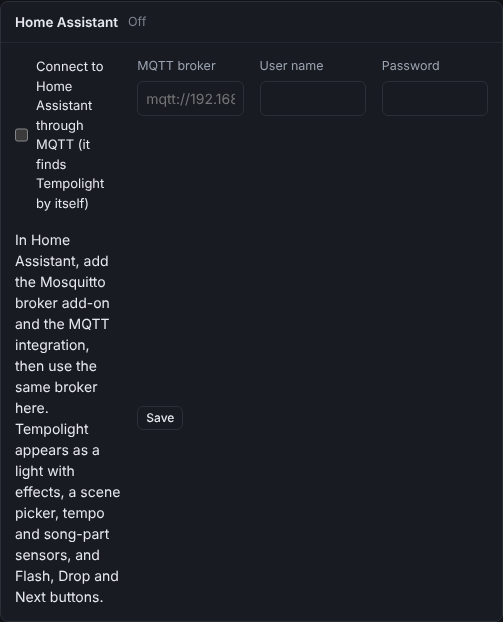
Tempolight talks to Home Assistant through an MQTT broker and announces itself (MQTT discovery), so it appears by itself.
- In Home Assistant: Settings → Add-ons → Add-on store → install and start Mosquitto broker, then add the MQTT integration when Home Assistant offers it (Settings → Devices & services).
- Make a Home Assistant user for Tempolight (Settings → People → Users), or use any user: Mosquitto accepts Home Assistant users.
- In Tempolight: Settings → Home Assistant: tick Connect to Home Assistant through MQTT, enter the
MQTT broker (
mqtt://homeassistant.local:1883, or your Home Assistant's IP address), the User name and Password, then Save. The panel's title says Connected (or Problem: … with the reason). - In Home Assistant: Settings → Devices & services → MQTT lists a Tempolight device.
What you get:
| Entity | What it does |
|---|---|
light.tempolight_lights | on/off, brightness, effect |
scene.party_mode, scene.chill_mode, … | one per Tempolight scene, same name; added and removed as you change scenes |
scene.tempolight_off | turns the lights off |
select.tempolight_scene | a scene picker |
sensor.tempolight_tempo, song part, music source | for automations ("when a drop starts…") |
| Flash, Drop now, Next effect buttons | the live pads |
Examples and automations: voice.md.
The Home Assistant add-on
On Home Assistant OS or Supervised, Tempolight can run on the Home Assistant machine itself:
- Settings → Add-ons → Add-on store → ⋮ → Repositories, add
https://github.com/D4RKGEEK/tempolight, close. - Find Tempolight in the store (reload the page if needed), Install (it builds on your machine, a few minutes the first time), Start, then Open web UI (port 8080).
- With the Mosquitto broker add-on installed, the add-on connects to it by itself: nothing to type.
It runs with host networking, so it finds your lights like a normal install. Options and details: the add-on's documentation.
Apple Home
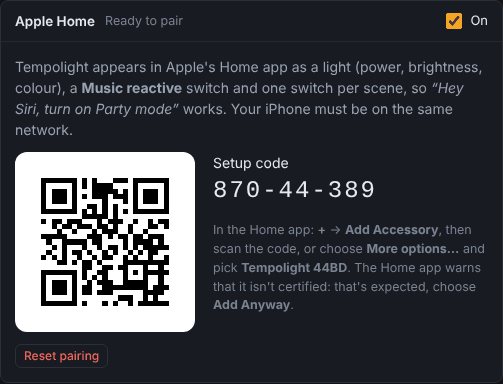
Tempolight is a HomeKit bridge itself: no Homebridge, no hub needed for use at home (a home hub, such as a HomePod or Apple TV, is needed for Siri away from home and for automations).
- In Tempolight: Settings → Apple Home → On. After a moment it says Ready to pair and shows a setup code and a QR code.
- On the iPhone (on the same Wi-Fi): open the Home app → + → Add Accessory → scan the QR code. Or tap More options… and pick Tempolight XXXX from the list, then type the setup code.
- The Home app warns that it's an uncertified accessory: that's expected, tap Add Anyway.
- Pick a room for each accessory, and done. The panel now says Paired and lists the paired devices.
What appears in the Home app:
| Accessory | What it does |
|---|---|
| Tempolight (a light) | on/off, brightness, colour. Picking a colour holds it; turning Music reactive on lets the music choose colours again |
| Music reactive (a switch) | on: effects follow the music (automatic); off: keep the current effect |
| One switch per scene (Party mode, Chill mode, …) | on applies the scene, and stays on while the show matches it; turning the active scene's switch off turns the lights off |
So "Hey Siri, turn on Party mode", "Hey Siri, set Tempolight to 30 percent" and Home app scenes and automations work. Renaming or adding scenes in Tempolight keeps the rooms and automations you made in the Home app.
- Several people: share your home in the Home app; don't pair again.
- Moving to another home: remove Tempolight in the Home app, then Reset pairing in Tempolight (it gets a new setup code).
- Not found by the iPhone: both must be on the same network (not a guest network), and Tempolight must not run in Docker Desktop (docker.md). The panel shows iPhones may not find Tempolight: … when announcing itself failed.
Voice: Google Assistant and Alexa
Google Assistant and Alexa reach Tempolight through Home Assistant (with or without Home Assistant Cloud). Every Tempolight scene becomes a scene you can say: "Hey Google, activate Party mode". Step by step, with and without Nabu Casa, and how to pick names that assistants understand: voice.md.
Wake up, sleep and the ambient plan
The Home & sleep page has a sunrise wake-up (weekly times or linked to your phone's alarm, with snooze), a sleep timer that fades out, and an hourly ambient plan for when no music plays. With zones, the sunrise can light only the bedroom. Phone alarm links for iPhone Shortcuts, Home Assistant and Tasker: wake-up.md.
Night mode and schedules
- Settings → Night mode and location: from a time (or
sunset) until a time (orsunrise), brightness is capped, colours stay warm and there are no strobes or drop flashes. Use my location fills in where you are, for sunrise and sunset times. - Scenes & schedules → Schedules: run a scene, lights on or off, or a brightness at a time (or at sunset/sunrise with minutes before or after), on chosen days. Times are the clock of the computer Tempolight runs on.
Advanced
- MQTT topics are under
tempolight/(the base) with discovery underhomeassistant/; both can be changed withTEMPOLIGHT_MQTT_BASEandTEMPOLIGHT_MQTT_PREFIX. Plain MQTT 3.1.1 on port 1883; TLS isn't supported. - With a PIN lock, Home Assistant and Apple Home keep working: they don't go through the browser lock.
- The HTTP API for everything else: api.md.